Showing posts with label dslr camera. Show all posts

Friday, October 17, 2008

What you can do with shutter speed

To know what sort of photos you can shoot by manipulating the use of shutter speed on your DSLR, you need to know what shutter speed is. Shutter speed is a speed made with a shutter. Haha…Just kidding.

Actually, a shutter speed is the measurement used to denote how long the shutter will allow lights to strike the censor component of your digital camera. This timing is measured in fractions of a second like 1/1000, 1/500, 1/250 or 1 for 1 second. The cool part of DSLR cameras is that you can play around with shutter speed settings and go creative about it.
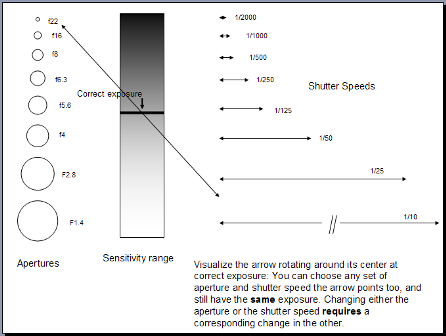
We can use the analogy in the previous post to exemplify this. So let’s go back to the window curtain example we mentioned before. If earlier the curtain opening is used to depict aperture size, shutter speed can be used to refer to the time of how long you will slide the window curtain to the side and then shut it back completely so that you being the censor can see what’s outside of the window.

The idea is that if you shut the curtain slowly, you get to see more things going on outside your window. If you shut the curtain very fast, you will literally see a still representation of what’s going on outside. You won’t be able to see the leaves falling slowly outside your window pane for instance.

Shutter speed can be used to take a photo with a sense of movement or motion. For example, you can take photo of moving traffic at night. With a slow shutter speed settings, you can create an effect as if the highway consists of fast moving lights instead or actual cars or other vehicles on the road.

Here’s how you can do it:

  1. Set dial to “S” for shutter speed priority settings. Again, different cameras use different symbols for the shutter speed priority selection so check your manual.
  2. You can set the shutter speed to 1/4 or longer like 1 second or more. The correct aperture setting will be set accordingly. Too add, you need to experiment depending on the amount of light available at the location of where you are taking the photo. Leaving the shutter open for too long may cause your photo to be too bright if they are many vehicles on the highway.
  3. Don’t forget to use auto focus and choose a suitable focal reference. You can use a non moving object to use as your focusing point. Use manual focus instead, if you can't get a sharp focus in range. Also, you need to use a tripod to avoid camera shake. Press the shutter release button halfway to activate auto focus.
  4. Press the shutter release button completely to take the photo. Keep practicing until you get the perfect shot.

Good luck.

Thursday, October 16, 2008

Understanding aperture in digital photography

For new DSLR users, the number of terminologies used in photography can be overwhelming and what they mean can be difficult to grasp. However, if you like reading the manual and learning more about them from various sources, you will likely to get a better understanding even as easy as under five minutes.

Aperture is one word that made me dropped my jaw when I first attended my photography club meetings during high school. During that time we were only exposed to non digital point and shoot and SLR cameras. I have forgotten most part of it as I find it cumbersome to go with films and having to spend that extra cash especially when I was still in school.

Ok, enough blabbering, so what is aperture really? Aperture is referred to the lens diaphragm opening inside a photographic lens. It is an adjustable gap in which light comes in, very similar to the iris of your eye. To illustrate this, imagine the window curtain of your room. It is a bright and sunshiny day outside. The curtain behaves like an aperture that controls the amount of light that enters your room. If you close your window curtain, you will shut the lights from entering your room thus having a very dark vision from within your room.

The usage of aperture is highly favored, used effectively and passionately by professional photographers. The difference for an amateur photographer like me or you is that we are learning and applying what we know about aperture at a much basic introductory level and practicing as much as we could to better our photographic experience.

So what are there to know about aperture? Aperture size is usually calibrated or configured in terms of f-numbers or f-stops. The lower the number of f-stops such as F2 means the larger opening of the lens diaphragm is. In contrast, high f-stops such as F22 would mean smaller aperture size.

On most DSLR cameras, there’s an aperture priority mode that you can use to capture images apart from program or automatic modes. Aperture priority basically means that you get to set the depth of field manually and your camera will set the right shutter speed in order to get the optimum exposure. This is possible because of the built-in electronic metering circuit available in most DSLR cameras.

Aperture is used to select the depth of field and combining aperture with shutter speed, you get the exposure such that

Exposure = Aperture + Shutter Speed